"I Gave Claude Code a 2-Sentence Idea at 9AM.
By Lunch, I had a Working App."
That's not a fantasy. That's Tuesday for builders who know the 7-Phase Launch Sequence.
This is a 4-day, hands-on workshop where you install, configure, and master the complete Claude Code system .
No coding experience required. No computer science degree. No $150/hr developer on retainer.
Just a repeatable framework, the right AI tools, and 8 hours of guided implementation with two experts who build this way every single day.
By 6:30 PM on June 4th, you'll have two working applications:
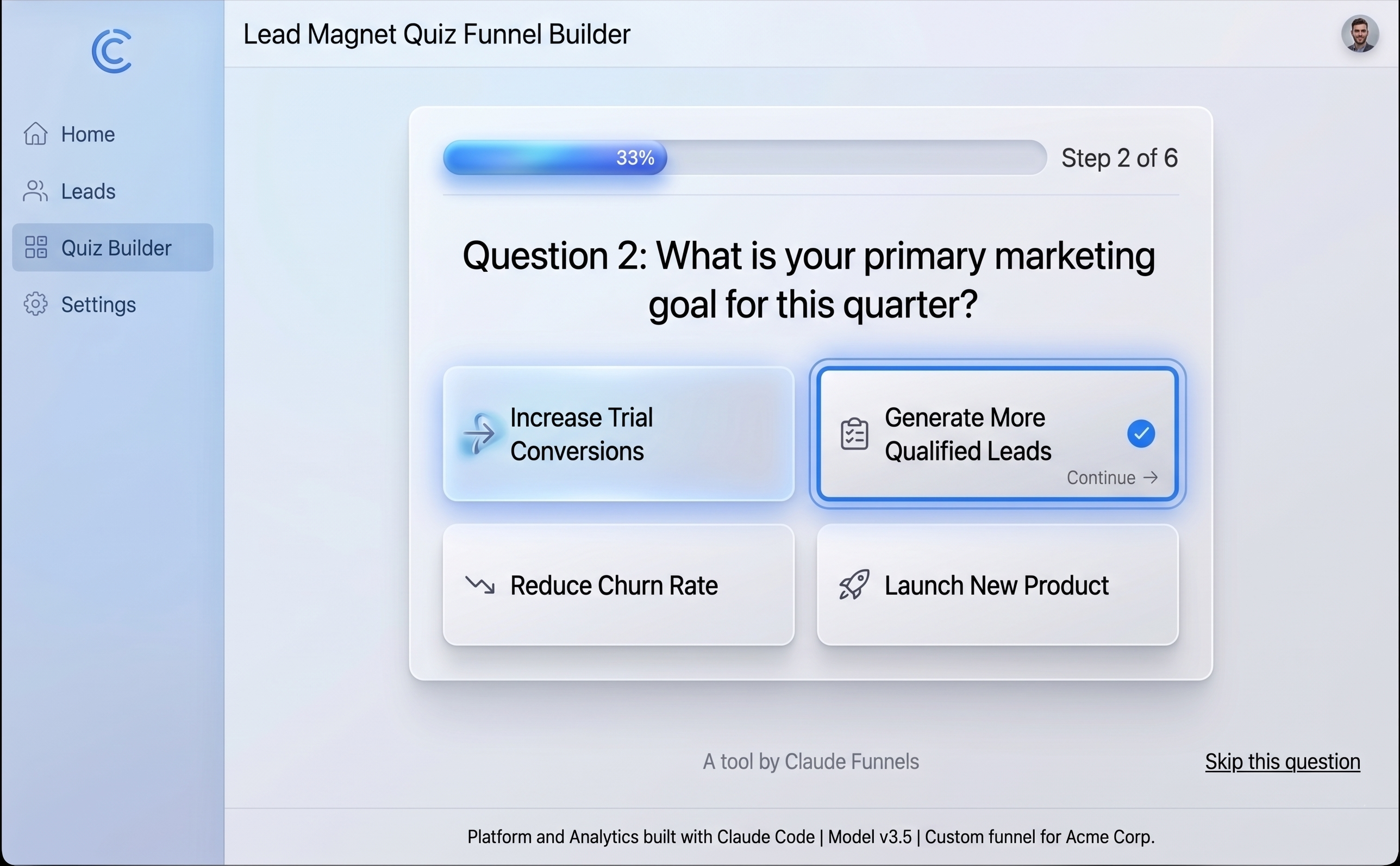
Lead Magnet Quiz Funnel
3–5 interactive questions. Email capture. Personalized results page based on user answers. Supabase database storing every lead. Live URL you can share on social media.
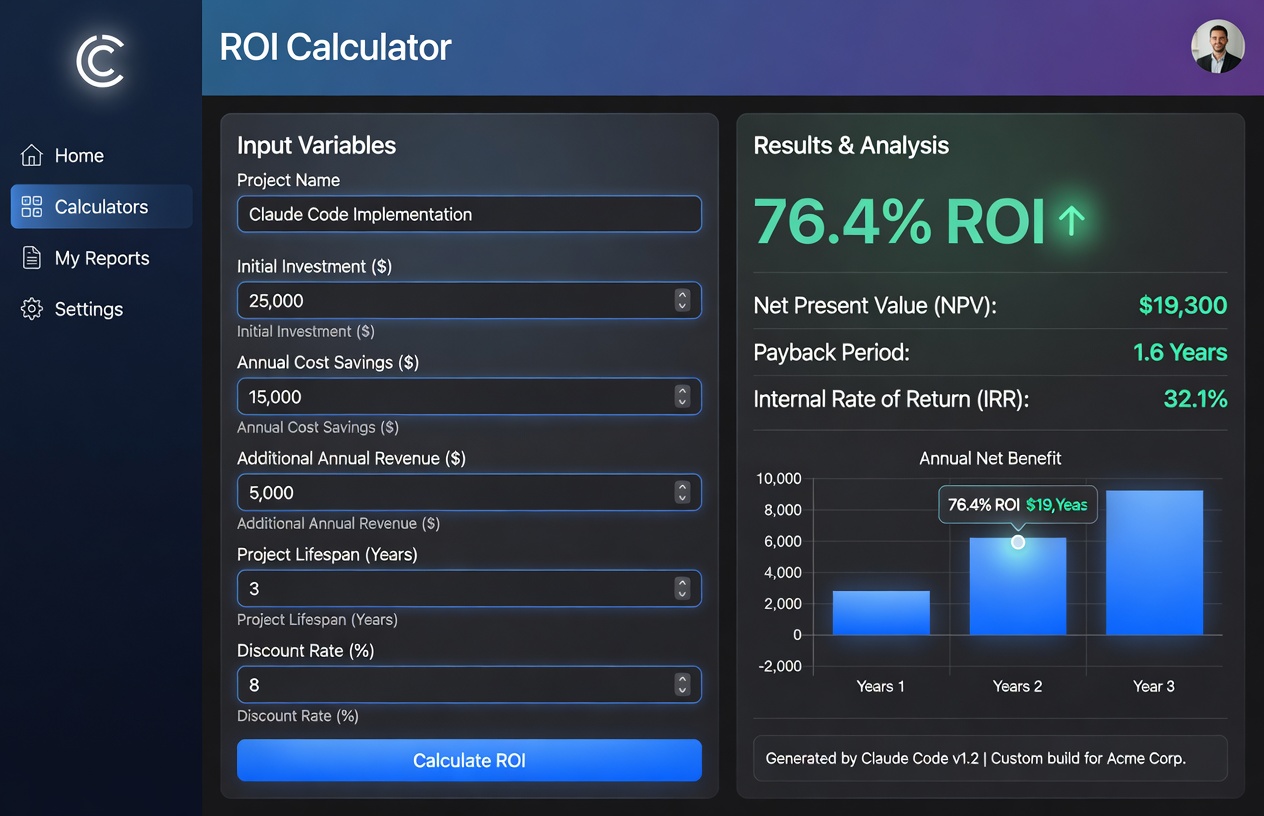
ROI Calculator
"Cost of Inaction" tool with slider inputs. Real-time annual loss calculations. Lead capture form with calendar booking integration.

Life Time Community Access
THE SHIFT
Most People Are Still Asking AI to Write Emails. A Small Group Is Using It to Build Entire Businesses.
If you've been paying attention to the AI builder space, you’ve felt something shift.
Some builders — many of them non-technical — are creating full applications in a single afternoon.
Apps with user accounts. Apps with live URLs they can text to a client that evening.
And they're not writing code the traditional way. They're directing AI agents like a project manager directs a development team. One agent reviews the code. Another handles the frontend. Another runs tests. Another deploys.
The tool at the center of all of it: Claude Code.
Here's the part that matters to you:
These aren’t all senior engineers.
Many of them are coaches, agency owners, consultants, and solopreneurs who — six months ago — couldn't have told you what a terminal was.
They loved those tools. Many still use them. But they discovered there was another level of capability available — a deeper way to work with AI that opens up things browser-based tools weren’t designed to handle.
They didn't become programmers. They became builders. There's a massive difference.
A programmer writes code. A builder directs AI to create exactly what their business needs — and ships it to the internet the same day.
This workshop turns YOU into a builder.
7mo
AI task capability has been roughly doubling at this rate. What took weeks now takes hours.
24%
of all GitHub code commits now involve Claude Code — and growing fast
4,200+
Students trained across AI building and automation by Nuno Tavares
$0.67/day
Cost of Claude Pro — vs. $350–500/day for a traditional developer
THE SHIFT
Most People Are Still Asking AI to Write Emails. A Small Group Is Using It to Build Entire Businesses.
If you've been paying attention to the AI builder space, you've felt something shift.
Some builders — many of them non-technical — are creating full applications in a single afternoon.
Apps with user accounts. Apps with live URLs they can text to a client that evening.
The tool at the center of all of it:
They're not writing code the traditional way. They're directing AI agents like a project manager directs a development team.
Here's the part that matters to you:
These aren't all senior engineers.
Many of them are coaches, agency owners, consultants, and solopreneurs who — six months ago — couldn't have told you what a terminal was.
They loved those tools. Many still use them. But they discovered there was another level of capability available — a deeper way to work with AI that opens up things browser-based tools weren’t designed to handle.
They didn't become programmers. They became builders. There's a massive difference.
A programmer writes code. A builder directs AI to create exactly what their business needs — and ships it to the internet the same day.
This workshop turns YOU into a builder.
of all GitHub code commits now involve Claude Code — and growing fast
AI task capability has been roughly doubling at this rate. What took weeks now takes hours.
Students trained across AI building and automation by Nuno Tavares
Cost of Claude Pro — vs. $350–500/day for a traditional developer
why claude code
What Happened on February 5th, 2026
And Why It Matters For Non-Technical Builders
On February 5th, 2026, Anthropic released Claude Opus 4 — and with it, a complete operating system for building software with AI in your terminal. Not a chatbot. Not a code generator. A team of agents that read your files, run your commands, and ship to production.
Within weeks, 24% of all GitHub commits involved Claude Code. The people moving fastest weren't traditional developers — they were operators, consultants, and solopreneurs who finally had the leverage to build the tools their businesses had been waiting on for years.
Why Claude Code
What Claude Code Actually Does (And Why It's Different From Every Other AI Tool You've Tried)
If you've experimented with Lovable, Bolt, Cursor, or Replit, you already know AI can generate code. That's not news.
What those tools can't do — by design — is give you full control over your development environment, run multiple AI agents in parallel, connect to external services like GitHub and databases, or deploy production applications.
Claude Code does all of that. Here's what it unlocks:
Terminal-Native Power
Claude Code works directly in your file system: your folders, your Git repos, your APIs. No browser sandbox. No platform middleman. Everything you build lives on your machine. You own it completely.
Agent Teams
Run multiple Claude instances simultaneously on the same project. A Code Reviewer checking for bugs while a Frontend Developer builds the UI while a Tester verifies everything works. Like having a development team that costs $0.67/day.
MCP Servers (Your AI's Hands)
"MCP servers are like USB ports for AI." Each one plugs a new capability into Claude: GitHub access, browser control, live documentation, web search, database connections. Without them, Claude is trapped in your project folder. With them, it can interact with the entire internet.
Skills System (Instant Expertise)
Pre-built knowledge packages that make Claude a specialist in seconds. Frontend design. Document creation. Brand voice. Code review. Install once, trigger with one word, reuse across every project you ever build.
CLAUDE.md Playbooks (The Secret Weapon)
Configuration files that encode exactly how YOU build: your standards, your style, your security rules, your project context. This is the behind-the-scenes reason some builders get incredible output from Claude Code while others get frustrated. Same tool. Different instructions. We give you the templates.
The 7-Phase Launch Sequence (Your Repeatable Framework)
Claude MD, PRD, Database, Security, GitHub, Deploy, and Sell. Seven phases that turn any idea into a live, deployed application. Learn it once. Use it for every app you ever build. This is the core IP of the workshop.
Think of your favorite AI building tool as a powerful car.
Claude Code is what happens when you pop the hood and get access to the engine.
Same direction. More power. Full control.
The Curriculum
Everything You'll Learn: 4 Days. 10 Lessons. 2 Apps.
This is the complete Claude Code operating system.
Monday, June 1st | 4:30 PM - 6:30 PM EST
Foundation:
"Install It Right or Debug It Forever"
Every reliable Claude Code build starts with a properly configured environment. This is the setup that 90% of YouTube tutorials skip — and it's why most beginners spend their first week troubleshooting instead of building. You won't have that problem.
Lesson 1: Installing Claude Code
VS Code, the Claude Code Extension, the CLI, Node.js, Git. Both Mac and Windows covered step by step. Authenticated and verified before your first prompt. We cover the Windows PATH configuration that silently breaks everything when done wrong. Plus a full walkthrough of Claude's three interfaces — Chat for strategy and troubleshooting, Co-work for autonomous scheduled tasks, and Code for building your projects — so you understand what each one does and when to use it.
Lesson 2: The CLAUDE.md Playbook
Give Claude persistent memory. You'll create a Global CLAUDE.md (your personal defaults that follow you everywhere) and a Project CLAUDE.md (project-specific rules and context). We'll walk through exactly where each file lives in your system, how to use the template we provide, and how to have Claude Chat build you a customized MD file from scratch. After this, Claude remembers your coding style, security rules, and project details every session. No more re-explaining yourself every time you open VS Code.
What you'll walk away with
Fully configured development environment
Persistent AI memory setup
Security guardrails installed
Desktop setup completed
Terminal setup completed
VS Code setup completed
Foundation for the next 3 days of work
Reusable setup for every future project
Tuesday, June 2nd | 4:30 PM - 6:30 PM EST
Power Tools: "Today Claude Gets Hands. Real Ones."
Day 1 gave Claude a brain and a memory. Day 2 gives it hands, eyes, and a team.
This is the day that changes how you think about what AI can do. You'll give Claude portable expertise, connect it to the outside world, and build your first AI agents — turning a single chat window into a coordinated development operation.
Lesson 3: Skills — Portable AI Expertise
Install pre-built knowledge packages that make Claude a specialist on demand. You'll explore the Plugin Marketplace with 118+ available skills, learn to vet and install third-party skills from trusted sources like Claude Templates and skills.sh, and create your first custom skill from scratch using the Skill Creator. Frontend design, document creation, code review — each one becomes a /slash-command you trigger with a single word. Install once, reuse across every project you ever build.
Lesson 4: MCP Servers
Claude without MCP servers is a brain without hands. You'll install 5 essential connections: Context7 (live documentation so Claude never uses outdated code), Sequential Thinking (structured reasoning), Playwright (browser automation — Claude can literally click through your app and test it), GitHub and Tavily (real-time web search). Plus, you'll learn the MCP hack — how to feed any platform's documentation to Claude and have it generate its own installation instructions. After this lesson, Claude isn't guessing — it's connected.
Lesson 5: Building Your AI Dev Team
Here's the secret most people miss: after about 7,500 words in a single Claude conversation, reliability drops roughly 50%. The fix? Stop trying to do everything in one chat. You'll learn to create specialized agents using the /agent command — each one with its own context window, its own model assignment, and its own job description. A security reviewer. A front-end developer. A copywriter. You choose the role, pick the model (Opus for precision, Sonnet for speed, Haiku for lightweight tasks), and control whether each agent is local to one project or available globally across everything you build. Even better — once Claude has your skills and agents configured, it starts deploying its own agents automatically when it recognizes a task that needs one. You direct the team. Claude staffs it. This is how you scale without context rot.
What you'll walk away with
Library of specialist AI skills
Claude connected to external tools
Ability to create AI agents on demand
Ability to deploy AI agents as needed
AI-powered development shop setup
Scalable system for future projects
Total cost: $0.67/day
Wednesday, June 3rd | 4:30 PM - 6:30 PM EST
Deployment: "Today You Go From Localhost to Live URL"
This is the day you stop being someone who builds things that only work on your laptop — and become someone who ships things the whole world can use.
You'll set up the full deployment stack, connect every piece of the pipeline, and watch a complete application get built and deployed end-to-end in real time.
Lesson 6: Supabase: Give Your Apps a Memory
Every real application needs a database. You'll create your Supabase account, connect the Supabase MCP and skill so Claude can create and manage databases on its own, and learn how Claude's agents can detect existing projects and optimize costs by reusing infrastructure instead of spinning up new resources every time. After this, your apps can store user data, track leads, and persist information between sessions — all managed by Claude.
Lesson 7: GitHub & Vercel — From Code to Live URL
Take your app from "works on my computer" to "anyone with the link can use it." You'll set up GitHub for version control (always private by default), connect Vercel for hosting, and sync them so every push to GitHub automatically deploys a live site. Live URL. Automatic HTTPS. Global CDN. Free tier. You'll also build a custom /deploy skill that handles the entire build-deploy-verify cycle in one command — so deployment becomes push-button, not a 15-step manual process.
Lesson 8: Your First Live Build
Watch the entire system come together. We'll build an application end-to-end — from creating the Claude MD file in Chat, to making the project folder, to using plan mode in VS Code, to watching Claude auto-invoke agents (front-end designer, Supabase agent, code reviewer), to deploying through GitHub to a live Vercel URL. You'll see exactly how the pieces from Days 1 and 2 combine into a real deployment workflow — and what to do when things break mid-build.
What you'll walk away with
Fully connected deployment pipeline
Supabase configured for the database
GitHub connected for code management
Vercel configured for hosting
Live application built during the session
Application deployed and accessible online
Reusable pipeline for future builds
Ready to build and ship two more applications tomorrow
Thursday, June 4th | 4:30 PM - 6:30 PM EST
Ship It: "Security. Build Day. Two Apps Live."
Everything converges on Day 4. A guest security specialist shows you how to protect what you build. Then you'll build and deploy two complete applications using everything you've learned — while learning the difference between sub-agents and agent teams that separates intermediate builders from advanced ones.
Lesson 9: App Security: Build It Right or Get Sued Later
This is the lesson nobody else teaches. Guest security specialist Kunal — former senior engineer at Amazon and rated #1 AWS security expert — walks you through the top security vulnerabilities in vibe-coded apps, why AI-generated code is insecure by default (45% of code from 100+ AI models has security holes), and what to do about it. You'll learn the difference between Tier 1 fixes you can handle yourself with simple prompts (exposed API keys, missing headers, input sanitization) and Tier 2 issues that need expert review (database access controls, authentication architecture). Plus, you'll use a free scanning tool to audit your own apps, get copy-paste prompts to fix common issues, and add OWASP security principles directly into your Claude MD file so every future build starts secure.
Lesson 10: Build Day: Two Apps, Deployed and Live
This is it. Two complete applications, built and shipped in one session:
App 1: Lead Magnet Quiz Funnel
3–5 interactive questions. Email capture. Personalized results page based on user answers. Supabase database storing every lead. Live URL you can share on social media. Use case: Capture leads and segment your audience automatically.
App 2: ROI Calculator
"Cost of Inaction" tool with slider inputs. Real-time annual loss calculations. Lead capture form with calendar booking integration. Use case: Show prospects exactly what they're losing by NOT working with you. Send them the link before a sales call and let the math do the selling.
Each app follows the deployment pipeline you built on Day 3: Claude MD → build with agents → deploy locally to preview → Supabase for database → security review → GitHub → Vercel.
You'll also learn the critical difference between sub-agents (independent workers with their own context windows — lower cost, sequential processing) and agent teams (agents that communicate with each other in parallel — higher cost, faster execution, better quality). A whiteboard breakdown shows exactly how context windows, token costs, and the orchestrator pattern work — so you can choose the right approach for your budget and your project.
Lesson 8: Your First Live Build
Watch the entire system come together. We'll build an application end-to-end — from creating the Claude MD file in Chat, to making the project folder, to using plan mode in VS Code, to watching Claude auto-invoke agents (front-end designer, Supabase agent, code reviewer), to deploying through GitHub to a live Vercel URL. You'll see exactly how the pieces from Days 1 and 2 combine into a real deployment workflow — and what to do when things break mid-build.
What you'll walk away with
Two deployed applications ready to use in your business this weekend
Security checklist built into your workflow
Clear understanding of when to use sub-agents
Clear understanding of when to use agent teams
Better control over build quality
Better control over your Claude usage and cost
Repeatable framework for building future apps
Framework you can use for your own business
Framework you can use for client projects
Framework you can use to build apps for sale
TOTAL
8 Hours of Hands-On Building
You install. You configure. You build.
🔒 Secure • Instant confirmation
Your Instructors
Learn From Two People Who Build This Way Every Day. Not Theorists Who Read a Blog Post Last Week.

Nuno Tavares
Creator, Vibe Coding Incubator
- 25 years Fortune 100 (Bank of America, Capital One)
- 4,200+ students trained
- HighLevel Award Winner
- Builds on Claude Code daily
Nuno didn't learn Claude Code to teach a workshop. He learned it because his businesses needed it. Then he spent months building the curriculum — writing every SOP, testing every command on both Mac and Windows, rebuilding entire lessons when real-world testing revealed that the documentation didn't match reality. The 10 SOPs you'll follow weren't written from theory. They were written from troubleshooting.

Kaila Love
AI Solutions Architect & Tech Founder
Ambassador: Lovable + n8n
Author of "AI: The Bootleg Brain"
Founder of The AI Homegirl
Ships production AI products weekly
Kaila translates deep technical workflows into something an operator can actually run on a Tuesday afternoon. She doesn't just know what these tools can do in theory — she knows what they do in the hands of real people building real businesses.
Nuno brings the systems architecture and deep Claude Code expertise.
Kaila brings the practical implementation and the ability to make technical concepts click.
Together: 8 hours of live, hands-on training for less than most developers charge for 60 minutes of their time.
The Cost Math Is Impossible to Ignore
$67
per workshop
All-in for 8 hours of live expert training.
VS
$350 – 500
per day
Traditional freelance developer.
Claude Pro runs at $20/month. The businesses that learn to build their own tools with AI will operate at a fundamentally different cost structure than those still outsourcing everything.
That's $8.37 per hour of expert-led, hands-on training.
🔒 Secure • Instant confirmation
OUTCOMES
By 6:30 PM on June 4th, You’ll Know How To:
Build + deploy full-stack apps using AI
Frontend, backend, database - shipped.
Connect 5 MCP servers
GitHub, Context7, Playwright, Sequential Thinking, Tavily.
Deploy to Vercel with one command
Live URL, HTTPS, global CDN.
Run a 5-agent AI dev team in parallel
Multiple Claudes coordinating live.
Set up Supabase databases without SQL
Auth, tables, storage - done.
Configure CLAUDE.md for persistent memory
Your conventions, locked in forever.
Install + create Skills
Trigger entire workflows with one word.
Master the 7-Phase Launch Sequence
The repeatable shipping protocol.
Create one-word slash commands
Encode entire workflows as shortcuts.
All of this for $67 - about $8.37/hour of expert-led, hands-on training.
Is This For You?
This Workshop Was Designed For Builders Who Are Ready For the Next Level
This IS For You If:
- You're non-technical: a coach, consultant, agency owner, or solopreneur.
- You've tried Lovable, Bolt, or Cursor - and want full control.
- You're ready to stop paying $350–500/day developers.
- You can commit 2 hours/evening for 4 days.
- You learn fastest by building, not by watching.
This Is NOT For You If:
- You're looking for "one prompt, done" magic.
- You want to passively watch someone else build.
- You're already an experienced Claude Code builder.
- You can't show up live for the workshop sessions.
- You're not willing to install software on your machine.
Bonuses
Workshop Bonuses - Included Free With Every Seat
These aren't throwaway PDFs. These are production-ready tools.
Bonus #01
Lifetime Community Access
- Private builder community
- Office hours + replays
- Job/project board
Bonus #02
Pre-Work Setup Guide
- Day-zero install checklist
- Mac + Windows tested
- Pre-flight troubleshooting
Bonus #03
Software Requirements Checklist
- Every tool you'll need
- Free tier sign-up paths
- What to skip and why
Most Valuable
Bonus #04
Complete SOP & Template Library
- Every CLAUDE.md template we use
- All 5 MCP configurations
- Slash command starter pack
- The 7-Phase Launch playbook
Bonus #05
Early-Adopter Pricing Lock
- Founding cohort pricing
- Locked across future cohorts
- First access to new modules
Pricing
Choose Your Workshop Experience
Standard Access
$67 one-time
Perfect for most attendees who want the core training and tools.
- 4 live workshop days (8 hours total)
- All 10 lessons + 2 live builds
- Complete CLAUDE.md template library
- All 5 MCP server configurations
- Skills + slash command starter pack
- The 7-Phase Launch Sequence playbook
- Lifetime community access
- Pre-work setup guide + checklists
- Early-adopter pricing lock
- Direct access during workshop sessions
VIP upgrade ($164) with lifetime recordings will be available during the workshop.
FAQ
Frequently Asked Questions
Setup & Requirements
Do I need any coding experience?
No prior coding experience is required. We start from the absolute basics and guide you step by step.
What software do I need before Day 1?
You only need a modern web browser and a free Claude account to get started.
Mac or Windows?
Both work perfectly. All the tools we use are web-based or cross-platform.
The Workshop
What's the format?
The workshop consists of live instruction followed by dedicated hands-on building time where you apply what you just learned.
Are sessions recorded?
Yes, all sessions are recorded and made available to you so you can review them at your own pace.
What if I miss a session?
No problem! You can catch up easily using the session recordings and our detailed written materials.
After You Register
What happens right after I register?
You will immediately receive a welcome email with links to join our private community and access your pre-work materials.
Are there upsells?
No. Your ticket includes full access to everything advertised. There are no hidden fees or required upgrades.
Refund policy?
We offer a money-back guarantee. If you realize the workshop isn't right for you, just let us know for a full refund.
Seats Are Filling — Join the Waitlist Before the Next Cohort Closes
📅 June 1st-4th | 4:30 - 6:30 PM EST
💻 LIVE. VIRTUAL. HANDS-ON.
Hard cap at 400 seats per cohort. Future cohorts will run at higher pricing.
🔒 Secure • Instant confirmation
You've Got Ideas. You've Got Business Problems That Software Could Solve. The Only Missing Piece Is the System.
That feeling doesn't go away. It grows.
Every week you watch another operator ship the tool you've been describing for a year. Every week the gap between "I have an idea" and "it's live" gets shorter for the people who learned the system - and longer for the people who didn't.
Four days from now, you can be on the other side of that gap. The waitlist is how you get there.
The 7-Phase Launch Sequence
The repeatable protocol for shipping anything.
10 Lessons · 4 Days · 2 Real Apps
End-to-end builds, not theory.
$67 · Eight Hours · Two Experts
Live, hands-on, founding-cohort pricing.
🔒 Secure • Instant confirmation


Kaila Love
AI Solutions Architect · "The AI Homegirl"
© 2026 Vibe Coding Incubator. All rights reserved. Terms & Condition | Privacy Policy
* Recordings available for VIP ticket holders only. All bonuses delivered digitally upon registration and completion of workshop.